Wednesday, July 3, 2024

DIFFERENCES: NIST CSF VS. 800-53 EXPLAINED

 I’ve watched the industry evolve and adapt over the years. One thing that remains a constant struggle for professionals is navigating the complicated world of frameworks. Two prominent frameworks that come to mind are the NIST Cybersecurity Framework (CSF) and the NIST Special Publication 800-53.

These frameworks can seem overwhelming and confusing, leaving many wondering where to begin. But fear not, as I take you through a journey of unlocking the differences between the frameworks, and how to make the most of each. Understanding the unique characteristics of each framework is crucial to comprehending how they can be most effectively used in different scenarios.

So stick with me, as we explore the NIST CSF and 800-53 frameworks and learn how you can utilize them to strengthen your organization’s cybersecurity posture while combating potential cyberattacks and data breaches.

IS NIST CSF THE SAME AS 800 53?

NIST CSF and NIST 800-53 are related but not quite the same thing. The NIST CSF, or Cybersecurity Framework, is a voluntary guideline for organizations to manage and reduce cybersecurity risk. On the other hand, NIST 800-53 is a more comprehensive guide specifically for federal agencies to establish, assess, and monitor the security controls of their information systems and organizations. However, the CSF is actually a component of the larger NIST 800-53 document.

Additionally, the NIST CSF shares many of the same controls as ISO 27001/2, which is a widely recognized international standard for information security management. Essentially, the controls within NIST CSF, NIST 800-53, and ISO 27001/2 are all designed to help organizations establish and maintain effective security measures to defend against cyber threats.

To sum it up, while NIST CSF is an important part of NIST 800-53, they are not the same thing. Both documents provide valuable guidance for cybersecurity practices, and they share many of the same controls as the ISO 27001/2 standard. It’s important for organizations to consider all of these frameworks in developing a comprehensive cybersecurity strategy that effectively addresses the unique risks they face.

·  The NIST Cybersecurity Framework is a voluntary guideline for organizations to manage and reduce cybersecurity risk.

·  NIST 800-53 is a comprehensive guide for federal agencies to establish, assess, and monitor security controls of their information systems and organizations.

·  The NIST CSF is a component of the larger NIST 800-53 document.

·  NIST CSF, NIST 800-53, and ISO 27001/2 share many of the same controls to establish and maintain effective security measures to defend against cyber threats.

·  Organizations should consider all of these frameworks when developing a comprehensive cybersecurity strategy that addresses their unique risks.

Pro Tips:

1. Understand the Basics: NIST CSF (Cybersecurity Framework) and 800-53 are both crucial frameworks for establishing a secure cybersecurity plan. While they differ in their purposes, it’s essential to understand the fundamentals of both frameworks.

2. Know the Difference: The NIST Cybersecurity Framework offers guidance for managing and reducing cybersecurity risks. On the other hand, NIST 800-53 provides a catalog of security and privacy controls that are required to protect the federal government’s information and assets.

3. Create a Roadmap: Establish a roadmap for implementing NIST CSF and 800-53 controls that align with your organization’s risks, operational structure, and budget.

4. Prioritize Based on Risks: Identify key risks that are specific to your organization and prioritize critical security and privacy controls in your cybersecurity framework.

5. Implement and Test: After the control implementation is done, testing must be performed to ensure the controls are working correctly to provide the level of security, confidentiality, and integrity necessary.

UNDERSTANDING NIST CSF AND 800-53

The NIST (National Institute of Standards and Technology) is a federal agency that develops and promotes standards, guidelines, and best practices to improve the cybersecurity and privacy of information systems. NIST Cybersecurity Framework (CSF) is a voluntary framework consisting of standards, guidelines, and best practices to manage and reduce cybersecurity risks. On the other hand, NIST 800-53 is a publication that provides a catalog of security and privacy controls for federal information systems and organizations. Both NIST CSF and NIST 800-53 are essential documents for ensuring the cybersecurity of information systems, but they are different and complementary.

THE RELATIONSHIP BETWEEN NIST CSF AND 800-53

The NIST CSF and 800-53 are related, but they are not the same thing. NIST CSF is an element of NIST 800-53, and it is designed to be complementary to the catalog of security and privacy controls provided by NIST 800-53. The NIST CSF helps organizations to understand, manage, and reduce cybersecurity risks in a way that is easy to understand, while NIST 800-53 provides a comprehensive list of security and privacy controls that can be used to protect an organization’s information systems. Together, these two documents provide a framework for managing cybersecurity risks.

THE COMPONENTS OF NIST 800-53

NIST 800-53 is a comprehensive publication that provides a list of security and privacy controls for federal information systems and organizations. The publication is divided into 18 control families, including access control, awareness and training, audit and accountability, configuration management, contingency planning, identification and authentication, incident response, maintenance, media protection, personnel security, physical and environmental protection, planning, program management, risk assessment, security assessment and authorization, system and communications protection, system and information integrity, and supply chain risk management.

HOW NIST CSF FITS INTO NIST 800-53

The NIST CSF is an element of NIST 800-53, and it is designed to be complementary to the catalog of security and privacy controls provided by NIST 800-53. The framework provides a way for organizations to assess and manage cybersecurity risks that are not explicitly addressed by NIST 800-53. The NIST CSF provides a common language and a flexible framework that can be adapted to meet the specific needs of any organization. The framework consists of five core functions, namely identify, protect, detect, respond, and recover.

COMPARING NIST CSF AND ISO 27001/2 CONTROLS

The NIST CSF and ISO 27001/2 both provide a framework for managing cybersecurity risks. However, there are some differences between these two frameworks. The ISO 27001/2 framework provides a comprehensive list of controls that must be implemented to protect an organization’s information systems. On the other hand, the NIST CSF provides a more flexible and adaptable framework that can be customized to meet the specific needs of an organization. Additionally, the NIST CSF has a focus on risk management, while the ISO 27001/2 framework has a focus on compliance.

BENEFITS OF USING NIST CSF AND 800-53 TOGETHER

Using NIST CSF and 800-53 together provides several benefits for organizations. Firstly, these two frameworks provide a comprehensive approach to managing cybersecurity risks. Secondly, they provide a common language for discussing cybersecurity risks, which can be helpful for communication and collaboration. Thirdly, these two frameworks are designed to be complementary, which means that they can be used together to meet the specific needs of an organization. Finally, using NIST CSF and 800-53 together can help organizations to meet regulatory requirements and best practices.

IMPLEMENTING NIST CSF AND 800-53 IN YOUR ORGANIZATION

Implementing NIST CSF and 800-53 in your organization requires a multi-step process. Firstly, you need to understand the requirements of these frameworks and how they can be implemented in your organization. You also need to assess your organization’s cybersecurity risks and identify the controls that are required to manage and reduce these risks. Next, you need to develop an implementation plan that outlines the steps required to implement these frameworks in your organization. Finally, you need to monitor and evaluate your organization’s cybersecurity posture to ensure that it remains effective and up-to-date. To summarize, implementing these frameworks requires a comprehensive and continuous approach to cybersecurity.

Overall, NIST CSF and NIST 800-53 are essential cybersecurity frameworks that provide a comprehensive approach to managing cybersecurity risks. While these two frameworks are different, they are complementary and should be used together to provide a comprehensive approach to cybersecurity. Implementing these frameworks requires a comprehensive approach that involves understanding the requirements, assessing risks, developing implementation plans, and monitoring and evaluating progress. By using these frameworks, organizations can be better prepared to manage cybersecurity risks and protect their information systems.


Friday, June 21, 2024

An auditor is a Watchdog and not a Bloodhound discuss?

 The Role of an Auditor: Watchdog vs Bloodhound

An auditor plays a crucial role in ensuring the integrity and accuracy of financial statements and providing an independent assessment of an organization's internal controls and operations. While some may argue that an auditor is a "watchdog," others may view them as a "bloodhound." Let's delve into the key characteristics of both perspectives to understand this debate better.

1. Watchdog: A watchdog, in the context of auditing, refers to an independent professional who acts as a guardian or overseer. Here are some reasons why an auditor can be considered a watchdog:

- Independent Oversight: Auditors are expected to maintain a high level of independence, objectivity, and integrity while performing their duties. They act as a safeguard against potential fraud, errors, and irregularities in financial statements. Their primary responsibility is to provide assurance to stakeholders, including shareholders, creditors, and regulators, that the financial information presented is reliable and accurate.

- Compliance with Laws and Regulations: Auditors ensure that an organization complies with applicable laws, regulations, and accounting standards. They review the internal control systems to identify any weaknesses or deficiencies that may lead to non-compliance. By assessing the effectiveness of internal controls, auditors contribute to the prevention and detection of non-compliance issues.

- Risk Management: Auditors assess the risk environment within an organization, identify potential risks, and provide recommendations to mitigate those risks. They evaluate the internal control systems and identify weaknesses that may expose the organization to risks such as fraud, misappropriation of assets, or inadequate financial reporting practices.

 2. Bloodhound: A bloodhound, on the other hand, refers to a detective-like approach where an auditor is seen as actively searching for any signs of wrongdoing or irregularities. Here are some reasons why an auditor can be considered a bloodhound:

- Forensic Analysis: Auditors perform detailed examination and analysis of financial records, transactions, and documents to identify any discrepancies or suspicious activities. They use various audit techniques, including data analysis, to uncover potential fraud or errors. This proactive approach helps in detecting financial irregularities and protecting the interests of stakeholders.

- Investigation and Verification: Auditors have the responsibility to investigate and verify the accuracy and completeness of financial information. They delve into the underlying details, gather evidence, and perform substantive testing to ensure that the financial statements are free from material misstatements. This thorough examination helps in uncovering any intentional or unintentional misrepresentation of financial information.

- Reporting and Disclosure: Auditors have a duty to report any material findings or issues identified during the audit process. They communicate their findings through the audit report, which provides crucial information to stakeholders. This transparency enhances the credibility of financial statements and helps in building trust among stakeholders.

 In conclusion, an auditor can be considered both a watchdog and a bloodhound. While the watchdog aspect focuses on the oversight and assurance role, the bloodhound aspect emphasizes the proactive and investigative nature of an auditor's work. Both perspectives are essential in maintaining the integrity and reliability of financial information, protecting the interests of stakeholders, and promoting transparency in business operations.

Thursday, March 3, 2022

SMTP server on Windows: setting up and installation

 SMTP server on Windows: setting up and installation.

This guide will cover the process of installing and configuring an smtp server on virual servers running Windows operating systems.

What it is

An SMTP server is used to send e-mail for exchange on the Internet and within a local network. Can be used to send system messages and log files.

Installation

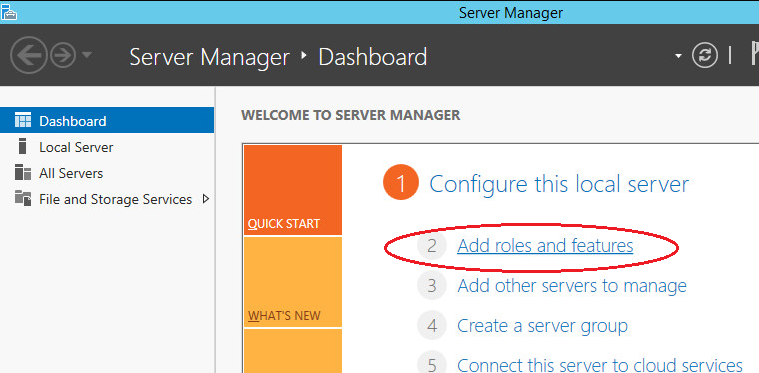
First you need to add the missing features.

SMTP Server--add roles-begin.png

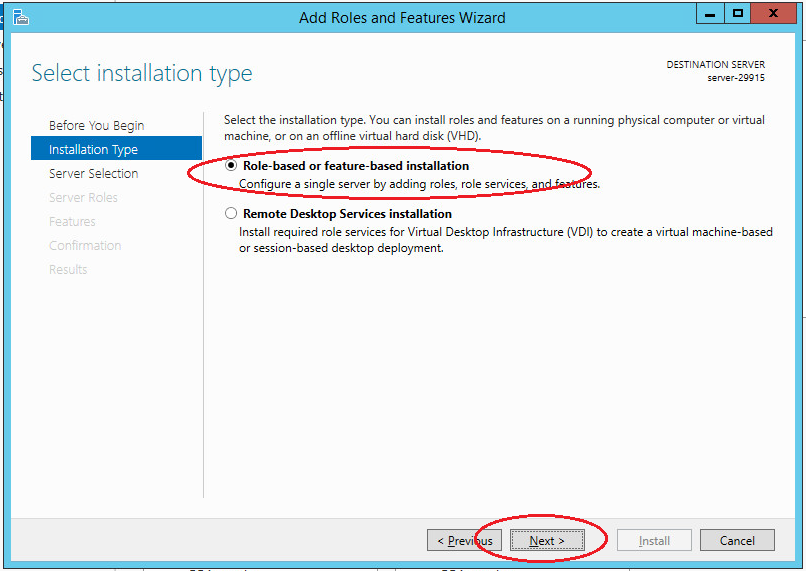
Select “Role-based or feature-based installation” and click “Next”.

SMTP Server--add roles-role-based select.png

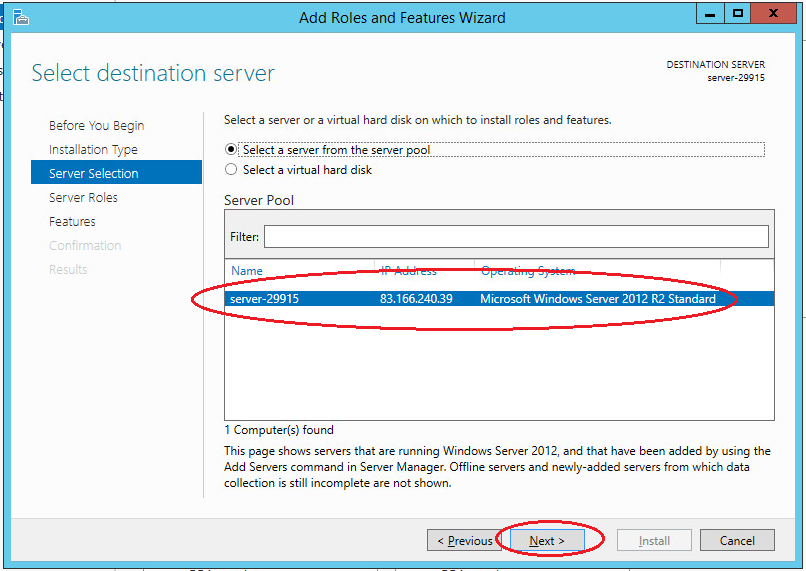
Choose needed server from the pool.

SMTP Server--add roles-role-choose server.png

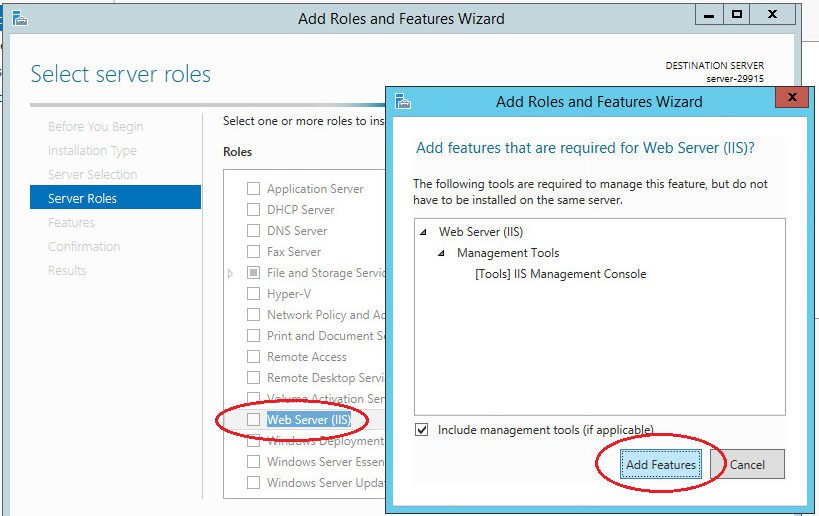
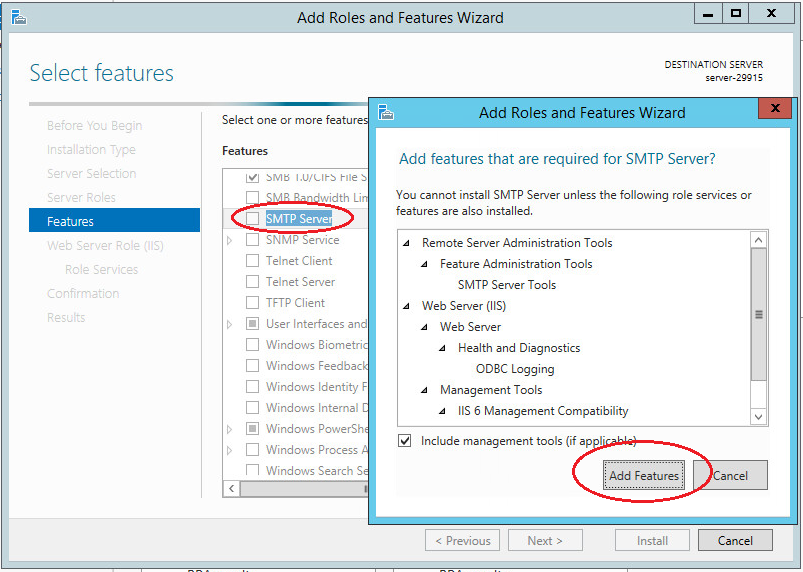
In the next step, select the “Web Server (IIS)” role. In the window that opens, click “Add features”. Web server (IIS) contains consoles to manage the SMTP service.

SMTP Server--add roles-add IIS.png

Next in the list of features, select “SMTP-server”. In the window that opens, click “Add features”.

SMTP Server--add roles-add SMTP.png

In the following steps, accept the default settings and complete the installation. Server reboot is not required.

SMTP server setup

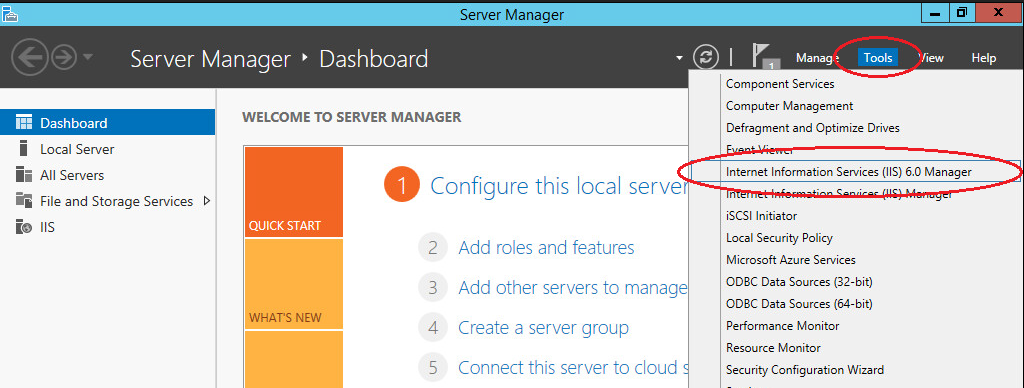
You can manage your SMTP server through Internet Information Services (IIS) Manager 6. To open IIS, go to Server Manager and in the menu in the upper right corner select “Tools” -> “IIS 6.0 Manager”.

SMTP Server--add roles- IIS manager.png

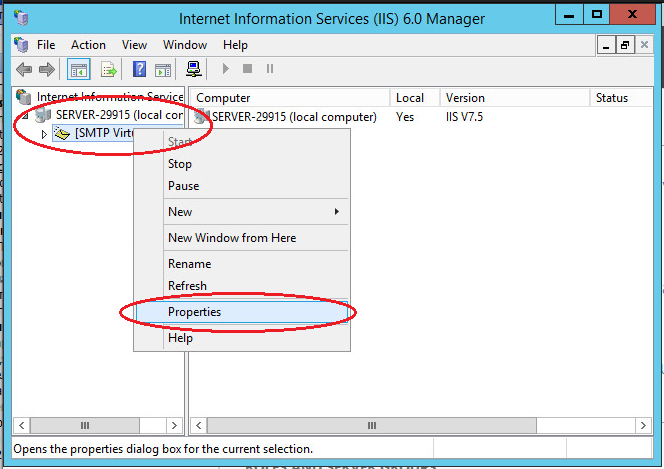
Expand the branch with the server name, select SMTP Virtual Server and open its properties.

SMTP Server--add roles- IIS manager properties.png

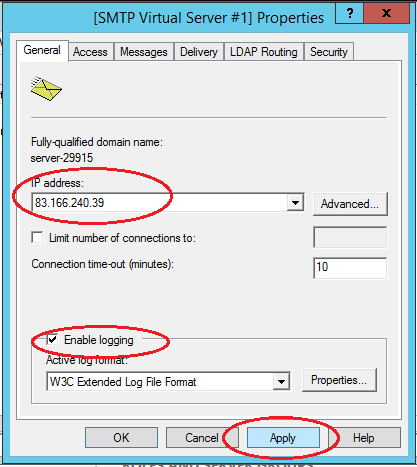
On the “General” tab, select your IP address on which the SMTP server should respond and enable logging to save information about all sent emails.

SMTP Server--add roles- IIS manager properties-general.png

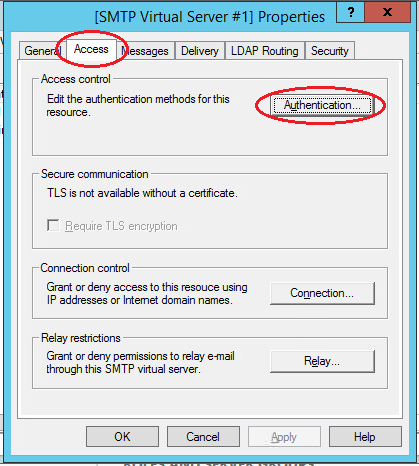
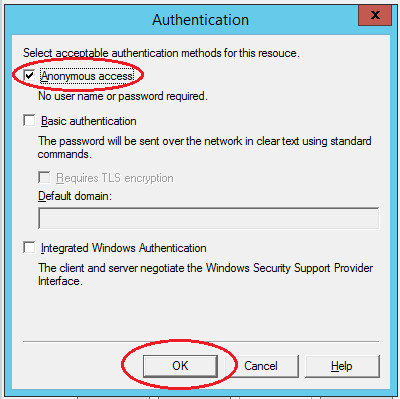
On the “Access” tab in the “Access Control” section, click the “Authentication” button. In the window that opens, check the box “Anonymous access” so that all users of the server and applications can use the SMTP server.

SMTP Server--add roles- IIS manager properties-Access.png

SMTP Server--add roles- IIS manager properties-Anonymous Access.png

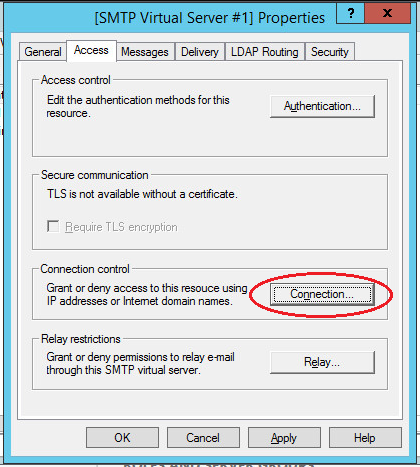
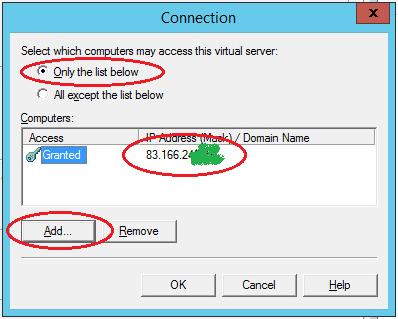
Next in the “Connection Control” section, click the “Connection” button. In the window that opens, allow access to the SMTP server to only certain computers by adding them to the list and selecting the connection type “Only computers from the list below”.

Note: do not forget to add the IP address of the server on which the SMTP server is configured.

SMTP Server--add roles- IIS manager properties-connection control.png

SMTP Server--add roles- IIS manager properties-connection srver ip.png

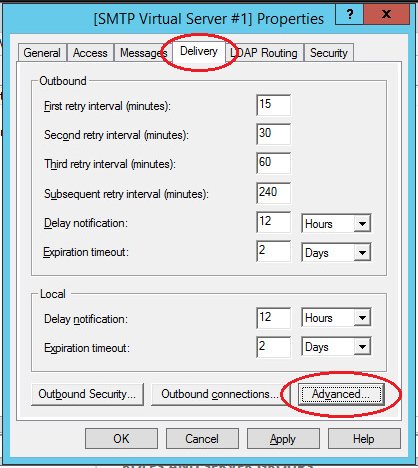
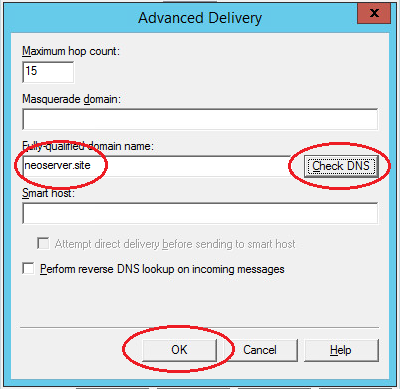
Next, on the “Delivery” tab, click the “Advanced” button. In the window that opens, in the “Fully Qualified Domain Name” field, enter your domain name or IP address.

SMTP Server--add roles- IIS manager properties-connection server delivery.png

SMTP Server--add roles- IIS manager properties-connection server name_0.png

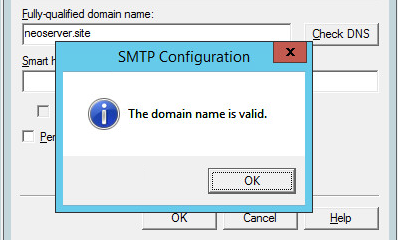
When checking DNS, the domain name must be valid.

SMTP Server--add roles- IIS manager properties-connection server name-1.png

Save all made changes.

SMTPSVC autorun service

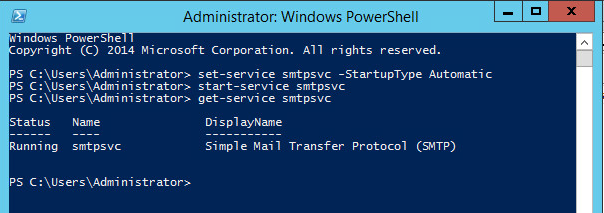
The SMTP server service should start automatically when the server is turned on. To do this, open a command bar and run the following commands:

Start the service;

Verify that the SMTPSVC service is running:

SMTP SVC autorun service.png

SMTP server testing

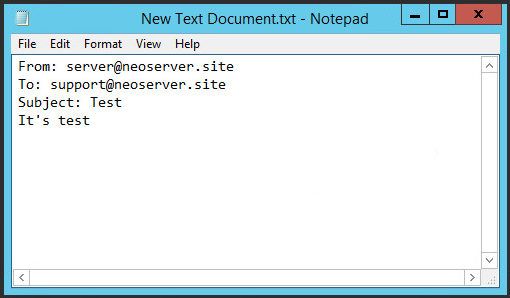
To check the correctness of the work, create any text document with the txt extension (for example, on the desktop), and enter the following lines, specifying from whom you are sending the letter and to whom:

SMTP Server--test.png

Notes:

  • in the mailing address of the sender, specify your domain or ip-address as the domain name, the mailbox name can be any;
  • Sent emails get spammed; to prevent this from happening you need to configure SPF and / or DKIM for your domain.

Next, transfer the created file to the C: \ inetpub \ mailroot \ Pickup directory. The file will disappear after a short time. Check the received email.

Wednesday, February 2, 2022

How to Find Listening Ports with Netstat and PowerShell and Kill process in window


Using Netstat to Find Active and Listening Ports

Netstat is one of those command-line utilities that seems like it’s been around forever. It’s been a reliable command-line utility to inspect local network connections for a long time. Let’s check out how to use it to find listening and established network connections.

Netstat has many different parameters. This tutorial will only use three of them. To learn more about what netstat can do, run netstat /?.

Assuming you’re on a Windows PC:

1. Open up an elevated command prompt (cmd.exe).

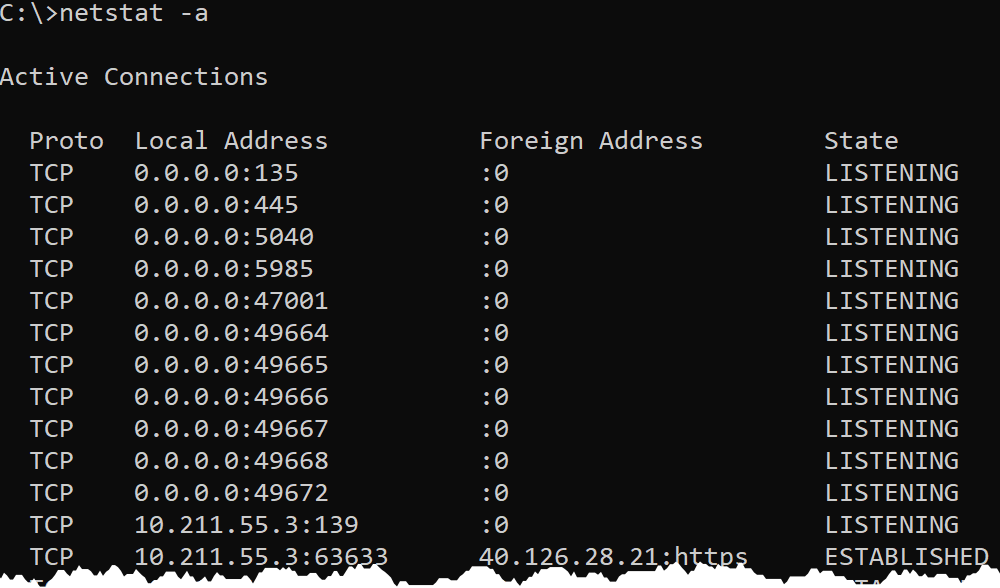
2. Run netstat -a to find all of the listening and established connections on the PC. By default, netstat only returns listening ports. Using the -a parameter tells netstat to return listening and established connections.

Run the Netstat -a
Run the Netstat -a

The output above is broken out into four columns:

  • Proto – shows either UDP or TCP to indicate the type of protocol used.
  • Local Address – shows the local IP address and port that is listening. For many services, this will be 0.0.0.0 for the IP part, meaning it is listening on all network interfaces. In some cases, a service will only listen on a single Network Interface (NIC). In that case, netstat will show the IP address of the NIC. A colon separates the IP address from the port that it is listening on.
  • Foreign Address – shows the remote IP address the local connection is communicating with. If the Foreign Address is 0.0.0.0:0, the connection is listening for all IPs and all ports. For established connections, the IP of the client machine will be shown.
  • State – shows the state the port is in, usually this will be LISTENING or ESTABLISHED.

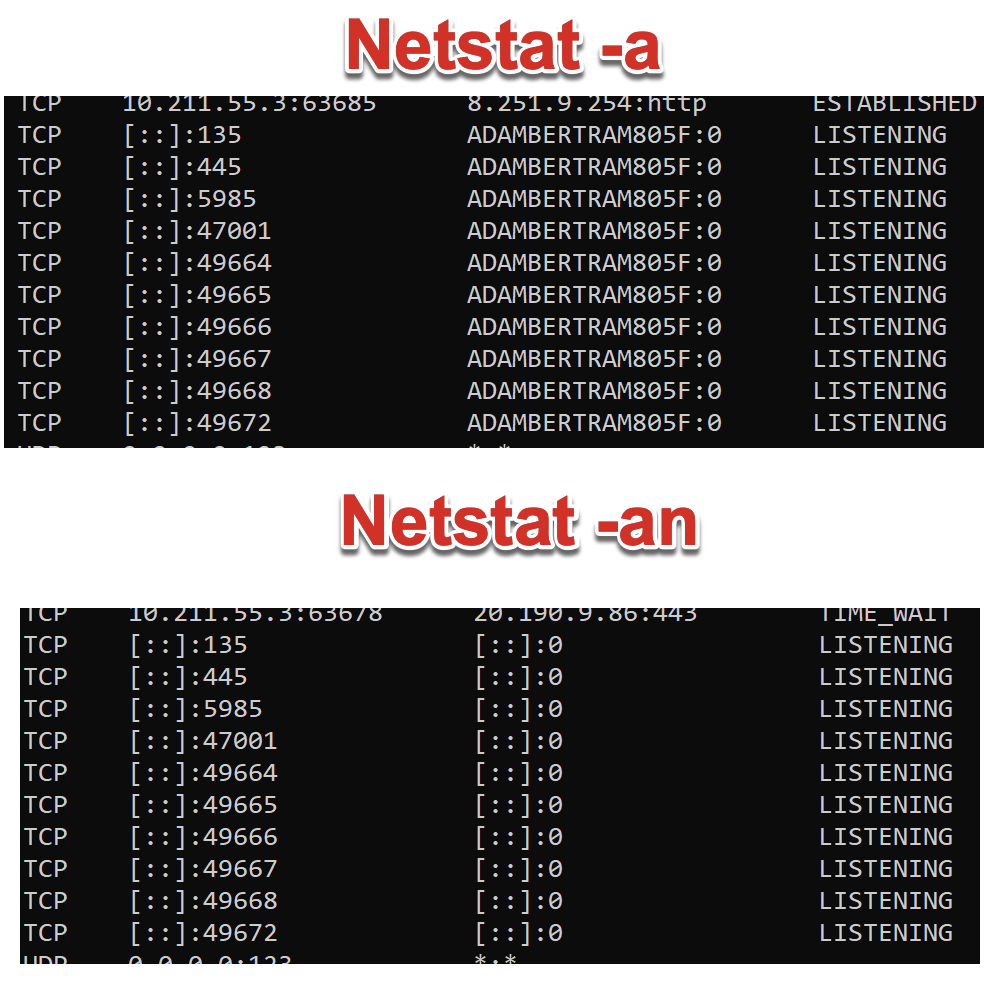
3. Now run netstat -an. You should now see that any names in the output have been turned into IP addresses. By default, netstat attempts to resolve many IP addresses to names.

run netstat -an
run netstat -an

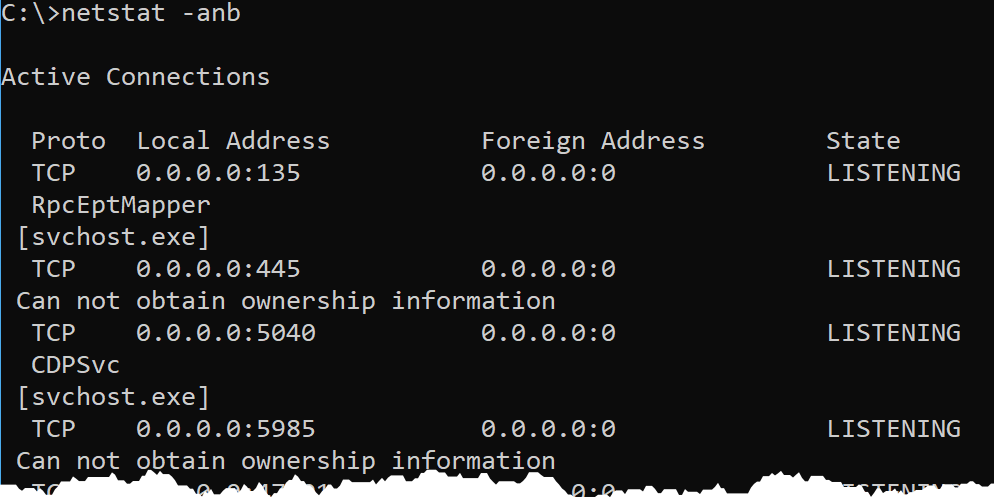
4. Finally, perhaps you’d like to know the Windows processes that are listening or have these connections open. To find that, use the -b switch.

Using the -b switch requires an elevated command prompt or PowerShell prompt. You will get the error The requested operation requires elevation if you use the -b switch in a non-elevated prompt.

netstat -anb
netstat -anb


How to kill port 443 in windows

 
netstat -ano | findstr :443
taskkill /PID <yourid> /F

 Ref: https://adamtheautomator.com/netstat-port/

          https://www.codegrepper.com/code-examples/shell/how+to+kill+port+443+in+windows

Monday, December 13, 2021

[Solved] Your message wasn’t delivered because the recipient’s mailbox is quarantined

 Few days back at one of my client, Exchange server has started to show anonymous behavior and Database got dismounted. We had a hard time to restore that database and make it keep running. Everything was okay, but very next day my client made me a call and told me, he does have some emails as a NDR saying ‘Your message wasn’t delivered because the recipient’s mailbox is quarantined’. So, I asked for the reference email and this here is the detail.

Issue:

Email send to the several users inside the organization are getting NDR with ‘Your message wasn’t delivered because the recipient’s mailbox is quarantined’. Also the users are not able to get access to their email too.


Cause:

This is called Poison Mailbox issue, any mailbox identified as potential threat to the mailbox database will be quarantined by Exchange server.The mailbox is a potential threat to the health of the Information store and has been quarantined. In case of Exchange we can do few manual processes to restore the mailbox, but in case of O365 we cannot because of its Multi-tenant environment. Although the quarantine will get restore after 24 hrs.

Resolution:

To identify the issue, first make sure you had the proper mailbox, you can check it with the below cmdlet.

For the single user

1

[PS] C:\Windows\system32>Get-MailboxStatistics username |fl *quarantine*

To check in whole database, how many users are quarantined..

1

[PS] C:\Windows\system32>Get-MailboxStatistics -Database EXMDB01 |Select DisplayName, IsQuarantined

Basically, after 24 hours your email will be restored, but if you want to restore manually you can use below cmdlet via  Access MS Exchange Management PowerShell:

1

[PS] C:\Windows\system32>Disable-MailboxQuarantine test01

When you check again for that mailbox, you will find it is restored….